Featured post

Free Online Money Earning, no investment required

If you are trying to earn money online & need only small extra income less than $200 (Rs.12,000) then PTC sites are the best way to st...

Showing posts with label Linux. Show all posts

10 BEST HACKING TOOLS FOR LINUX


Hi folks...
As we know Linux is a hacker’s dream computer operating system. It supports tons of tools and utilities for cracking passwords, scanning network vulnerabilities, and detecting possible intrusions. I have here a collection of 10 of the besthacking and security software tools for Linux. Please always keep in mind that these tools are not meant to harm, but to protect.

1. John the Ripper

John the Ripper is a free password cracking software tool initially developed for the UNIX operating system. It is one of the most popular password testing/breaking programs as it combines a number of password crackers into one package, autodetects password hash types, and includes a customizable cracker. It can be run against various encrypted password formats including several crypt password hash types most commonly found on various Unix flavors (based on DES, MD5, or Blowfish), Kerberos AFS, and Windows NT/2000/XP/2003 LM hash. Additional modules have extended its ability to include MD4-based password hashes andpasswords stored in LDAP, MySQL and others.


2. Nmap 

Nmap
 is my favorite network security scanner. It is used to discover computers and services on a computer network, thus creating a "map" of the network. Just like many simple port scanners, Nmap is capable of discovering passive services on a network despite the fact that such services aren't advertising themselves with a service discovery protocol. In addition Nmap may be able to determine various details about the remote computers. These include operating system, device type, uptime, software product used to run a service, exact version number of that product, presence of some firewall techniques and, on a local area network, even vendor of the remote network card.

Nmap runs on Linux, Microsoft Windows, Solaris, and BSD (including Mac OS X), and also on AmigaOS. Linux is the most popular nmap platform and Windows the second most popular.


3. Nessus

Nessus
 is a comprehensive vulnerability scanning software. Its goal is to detect potential vulnerabilities on the tested systems such as:

-Vulnerabilities that allow a remote cracker to control or access sensitive data on a system.
-Misconfiguration (e.g. open mail relay, missing patches, etc).
-Default passwords, a few common passwords, and blank/absent passwords on some system accounts. Nessus can also call Hydra (an external tool) to launch a dictionary attack.
-Denials of service against the TCP/IP stack by using mangled packets

Nessus is the world's most popular vulnerability scanner, estimated to be used by over 75,000 organizations worldwide. It took first place in the 2000, 2003, and 2006 security tools survey from SecTools.Org.


4. chkrootkit

chkrootkit
 (Check Rootkit) is a common Unix-based program intended to help system administrators check their system for known rootkits. It is a shell script using common UNIX/Linux tools like the strings and grep commands to search core system programs for signatures and for comparing a traversal of the /proc filesystem with the output of the ps (process status) command to look for discrepancies.

It can be used from a "rescue disc" (typically a Live CD) or it can optionally use an alternative directory from which to run all of its own commands. These techniques allow chkrootkit to trust the commands upon which it depend a bit more.

There are inherent limitations to the reliability of any program that attempts to detect compromises (such as rootkits and computer virus). Newer rootkits may specifically attempt to detect and compromise copies of the chkrootkit programs or take other measures to evade detection by them.


5. Wireshark

Wireshark
 is a free packet sniffer computer application used for network troubleshooting, analysis, software and communications protocol development, and education. In June 2006, the project was renamed from Ethereal due to trademark issues.

The functionality Wireshark provides is very similar to tcpdump, but it has a GUI front-end, and many more information sorting and filtering options. It allows the user to see all traffic being passed over the network (usually an Ethernet network but support is being added for others) by putting the network interface into promiscuous mode.

Wireshark uses the cross-platform GTK+ widget toolkit, and is cross-platform, running on various computer operating systems including Linux, Mac OS X, and Microsoft Windows. Released under the terms of the GNU General Public License, Wireshark is free software.


6. netcat

netcat
 is a computer networking utility for reading from and writing to network connections on either TCP or UDP.

Netcat was voted the second most useful network security tool in a 2000 poll conducted by insecure.org on the nmap users mailing list. In 2003, it gained fourth place, a position it also held in the 2006 poll.

The original version of netcat is a UNIX program. Its author is known as *Hobbit*. He released version 1.1 in March of 1996.

Netcat is fully POSIX compatible and there exist several implementations, including a rewrite from scratch known as GNU netcat.


7. Kismet

Kismet
 is a network detector, packet sniffer, and intrusion detection system for 802.11 wirelessLANs. Kismet will work with any wireless card which supports raw monitoring mode, and can sniff 802.11a, 802.11b and 802.11g traffic.

Kismet is unlike most other wireless network detectors in that it works passively. This means that without sending any loggable packets, it is able to detect the presence of both wireless access points and wireless clients, and associate them with each other.

Kismet also includes basic wireless IDS features such as detecting active wireless sniffing programs including NetStumbler, as well as a number of wireless network attacks.


8. hping

hping
 is a free packet generator and analyzer for the TCP/IP protocol. Hping is one of the de facto tools for security auditing and testing of firewalls and networks, and was used to exploit the idle scan scanning technique (also invented by the hping author), and now implemented in the Nmap Security Scanner. The new version of hping, hping3, is scriptable using the Tcl language and implements an engine for string based, human readable description of TCP/IP packets, so that the programmer can write scripts related to low level TCP/IP packet manipulation and analysis in very short time.

Like most tools used in computer security, hping is useful to both system administrators and crackers (or script kiddies).


9. Snort

Snort
 is a free and open source Network Intrusion prevention system (NIPS) and network intrusion detection (NIDS) capable of performing packet logging and real-time traffic analysis on IP networks.

Snort performs protocol analysis, content searching/matching, and is commonly used to actively block or passively detect a variety of attacks and probes, such as buffer overflows, stealth port scans, web application attacks, SMB probes, and OS fingerprinting attempts, amongst other features. The software is mostly used for intrusion prevention purposes, by dropping attacks as they are taking place. Snort can be combined with other software such as SnortSnarf, sguil, OSSIM, and the Basic Analysis and Security Engine (BASE) to provide a visual representation of intrusion data. With patches for the Snort source from Bleeding Edge Threats, support for packet stream antivirus scanning with ClamAV and network abnormality with SPADE in network layers 3 and 4 is possible with historical observation.


10. tcpdump

tcpdump
 is a common computer network debugging tool that runs under the command line. It allows the user to intercept and display TCP/IP and other packets being transmitted or received over a network to which the computer is attached.

In some Unix-like operating systems, a user must have superuser privileges to use tcpdump because the packet capturing mechanisms on those systems require elevated privileges. However, the -Z option may be used to drop privileges to a specific unprivileged user after capturing has been set up. In other Unix-like operating systems, the packet capturing mechanism can be configured to allow non-privileged users to use it; if that is done, superuser privileges are not required.

The user may optionally apply a BPF-based filter to limit the number of packets seen by tcpdump; this renders the output more usable on networks with a high volume of traffic.

If you have Any Queries Ask me in form Of Comments and don't forget to share and join this blog and like us on Facebook......

Download Google Chrome For RedHat Enterprise Linux 6 | rhel 6

Hello guys,
Google Chrome is the best Web Browser rated by worldwide but RedHat does not support it.
So, friend I have found a trick to do this. This I have done by myself and is easy to do it.

First Download Google Chrome From Here ==> Google Chrome

After going to the above link click on Download Chrome and then it will open a box there at right corner select  32 bit .rpm (For Fedora/openSUSE) OR  64 bit .rpm (For Fedora/openSUSE) which ever you want. ( Remember RedHat support .rpm file )
Then click Accept and Install. This will open a dialog box there Click Save as and ok. ( Remember do not click in run as. Only Click in Save as ).

After Download just install it. It will ask for Root Authentication, type the password and install it.

How to Open it.....
Application => Internet => Google Chrome

Now you are done.Enjoy ....

Waiting for you Comment.. :D Do not forget to Like,share ....... :)
Subscribe Admin..... :D

Howto: Installing Google Chrome on RHEL 6 for x86 and x86_64 | Red Hat Enterprise Linux 6


Hello Guys,
Today, I am sharing one Howto for Google Chrome on RHEL 6.You can follow this how to on both Architecture. 32bit and 64 bit. By Following this steps you’ll able to Install Google Chrome in Just Two Steps.
Google Chrome is not supported on RHEL 5.x/ CentOS 5.x as there is a older libraries and RPM Issues, But in Red Hat Enterprise Linux 6 Yon install Google Chrome without any dependency issue.
Its lot easy to install Google Chrome on RHEL 6. You just Need to follow the steps and thats is you will able to install Google Chrome on RHEL 6.
To Install Google Chrome on Red Hat Enterprise Linux you have to use Google’s YUM repository itself.
Following are the requirements to Install Google Chrome on RHEL 6 :-
1) You have to be root to follow this how to.
2) YUM should work from Terminal.3) Following RPM Must be installed
redhat-lsb-4.0-2.1.el6.i686libcurl-7.19.7-16.el6.i686If you are using x86_64 (64bit then RPM Architecture looks like following )
libcurl-7.19.7-16.el6.x86_64
wget http://ask4itsolutions.com/RPMs/google-chrome-i386.repo -O /etc/yum.repos.d/google-chrome-i386.repo
[tejas_barot@ask4itsolutions ~]#yum -y install google-chrome-stable
Click on Applications -> Internet -> Click on Google Chrome
wget http://ask4itsolutions.com/RPMs/google-chrome-64bit.repo -O /etc/yum.repos.d/google-chrome-64bit.repo
[tejas_barot@ask4itsolutions ~]#yum -y install google-chrome-stable
Click on Applications -> Internet -> Click on Google Chrome

redhat-lsb-4.0-2.1.el6.x86_64
If you have not installed above RPMs don’t worry, Above both RPMs available in Installation Media so you can install it easily.
To Install Google Chrome on 32bit Perform Following Steps :-
1) Execute Following Command as a root to setup Google Repository.
2) Now Execute Following Command as a root to Install Google Chrome on RHEL 6  :-
As per your Internet connection speed it will be installed, So Wait for Few Minutes until it gets Installed.
3) To Use Google Chrome on RHEL 6, Perform Following :-
That’s It. Start Using Google Chrome on Red Hat Enterprise Linux 6. :) 
To Install Google Chrome on x86_64 (64bit) Perform Following Steps :-
1) Execute Following Command as a root to setup Google Repository.
2) Now Execute Following Command as a root to Install Google Chrome on RHEL 6  :-
As per your Internet connection speed it will be installed, So Wait for Few Minutes until it gets Installed.
3) To Use Google Chrome on RHEL 6, Perform Following :-
That’s It for x86_64 ( 64bit). Start Using Google Chrome on Red Hat Enterprise Linux 6. :)
Let me know threw comment if you face any issues
Waiting for your Feedback Guys.
Enjoy Google Chrome on Linux :) Enjoy Google Chrome on RHEL 6 :) Enjoy Linux :) Enjoy Open Source :)

[DEV][TOOL] Debdroid v3 - Multi-Device Linux Chroot - [Backtrack|Debian|Arch]


Debdroid supports any Android device with loopback devices and ext2, flashable zip works on ICS/GB. Must have superuser.apk and su/bash.
Succesfully tested on Samsung Galaxy SII, Epic 4G Touch, Motorola Atrix, HTC EVO, HTC Incredible, Motorola Xoom.

Gitbrew.org is now the official maintainer of BackTrack-ARM

Official Debdroid release page
Official Debdroid wiki page

Downloads:


Flashable zip (TESTED WITH ROGUE CWM) - http://gititbit.ch/ddba3 - Works with ICS/GB

Distro Images: 
These custom images are resized to 3.25gb to fit on all FAT32 sdcards. 
4GB is the file size limit.

Note: Rename all .img to linux.img unless you specify otherwise in your conf.

Backtrack 5 ARM 3.5gb img Original - http://gititbit.ch/bt5d0
Backtrack 5 ARM 3.5gb img Custom - http://gititbit.ch/bt5d1

Debian Squeeze 1gb img - http://gititbit.ch/ddb1
Debian Squeeze 2gb img - http://gititbit.ch/ddb2
Debian Squeeze 3gb img - http://gititbit.ch/ddb3
Debian Squeeze 4gb img - http://gititbit.ch/ddb4
Debian Squeeze 5gb img - http://gititbit.ch/ddb5

Debian Lenny 750mb img - http://gititbit.ch/ddb0

Expect to see updates for this project.
Download and submit other tools with Gitbrew's Content Database
www.gitbrew.org/android/ 
www.gitbrew.org/e4gt/

Top 5 Best Linux OS Distributions

As part of the contest that was conducted a while back, I got around 200 responses from the geeky readers who choose their favorite Linux distributions.

Based on this data, the top spot in the best Linux distribution list goes to…

Ubuntu

My personal favorite was Ubuntu for desktop (#1 in this list) and Red Hat for servers (#5 in this list).

If you are new to any of the distros listed in the top 5, read the rest of the article to understand little bit more about those distros and find out whether your favorite Linux distribution made it in the top 5.


Linux Distro Review
Fig: Favorite Linux Distribution Voting Results

1. Ubuntu

Ubuntu 8.04 LTS Desktop
Like most of you, Ubuntu is my #1 choice for desktop Linux. I use it both at home and work. Ubuntu is the #1 in the Linux desktop market and some use Ubuntu for the servers also. Ubuntu offers the following three editions.
  • Ubuntu Desktop Edition
  • Ubuntu Server Edition
  • Ubuntu Notebook Remix

Additional Details:

Refer to our Ubuntu Tips and Tricks article series.

2. Debian

Debian 4.0r8, or etch
Debian is also called as Debian GNU/Linux, as most of the basic OS tools comes from the GNU Project. Lot of other famous distributions are based on Debian, which includes our #1 distro Ubuntu and many others — such as Knoppix, Linspire, Damn Small Linux etc.,

Additional Details:

Read more about Debian Distribution at wikipedia.

3. Fedora

Fedora 10 Server Edition
Fedora is sponsored by Red Hat. If you are interested in experimenting with the the leading technologies, you should use fedora, as the release cycle is very short and fedora tends to include the latest technology software/packages in it’s distribution.

Additional Details:

Read more about Fedora Distribution at wikipedia.

4. CentOS

CentOS 5 Linux Distro
If your organization does not want to spend money on purchasing Red Hat support, but still want all the benefits of the red-hat distribution, this is obviously the best choice, as this is totally based on the red-hat enterprise Linux.

As you can imagine the Nort American Enterprise Linux vendor mentioned in the quote below is Red Hat.
From the CentOS website: CentOS 2, 3, and 4 are built from publically available open source SRPMS provided by a prominent North American Enterprise Linux vendor. CentOS is designed for people who need an enterprise class OS without the cost or support of the prominent North American Enterprise Linux vendor.

Additional Details:

Read more about CentOS Distribution at wikipedia

5. Red Hat

Linux Red Hat 4 Enterprise Linux for Server
This is my favorite server distribution.  If an organization doesn’t mind spending dollars on purchasing the red-hat support, this is always my #1 recommendation to any organization who runs mission critical applications.

On a side note, one of the reason I like Red Hat Linux for mission critical production application is that Red Hat tends to take some of the new features from Fedora, which is well tested by the community.

Additional Details:

Read more about Red Hat Distribution at wikipedia.

Google Earth 6.2.1 | Download


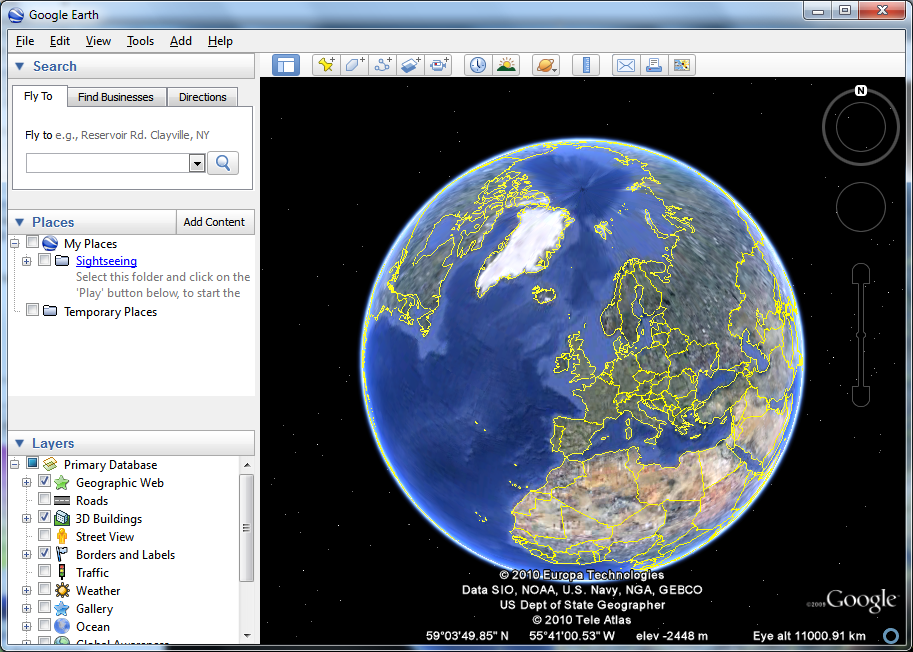
Google Earth
Explore the world in which we life with Google Earth
Google Earth enables you to travel the world from the comfort of your desktop, exploring stunning satellite imagery in stunning 3D. The fluid interface makes it easy to jump from country to country and zoom right in to street level. Certain key cities around the world benefit from 3D tours which can be used to take a virtual tour of key landmarks and get a feeling of the lay of the land.
You can also search for local businesses and places of interest, and the pinpointing tools mean that it is possible to bookmark locations on the map and share them with others. This feature can also be used to create virtual sightseeing tours - perhaps to show off the route you have taken on your travels.
While the program is immense fun, it can also be put to more serious uses. A range of different maps can be displayed, including historical maps which can show how country boundaries have changed over the years. Google Earth can also be used as route planner and to find out valuable information about towns, cities and country you plan to visit. Additional components are available that can be used to take virtual tour of the sky, moon and sun and the way in which users are invited to generate their own content to add to maps means that there is always something new to find.
Verdict:
An educational tool which is also a great deal of fun, Google Earth bring geography to life.


Androite XDA. Powered by Blogger.